This is a new observation for me - I think it’s been happening for 2-3 weeks now.
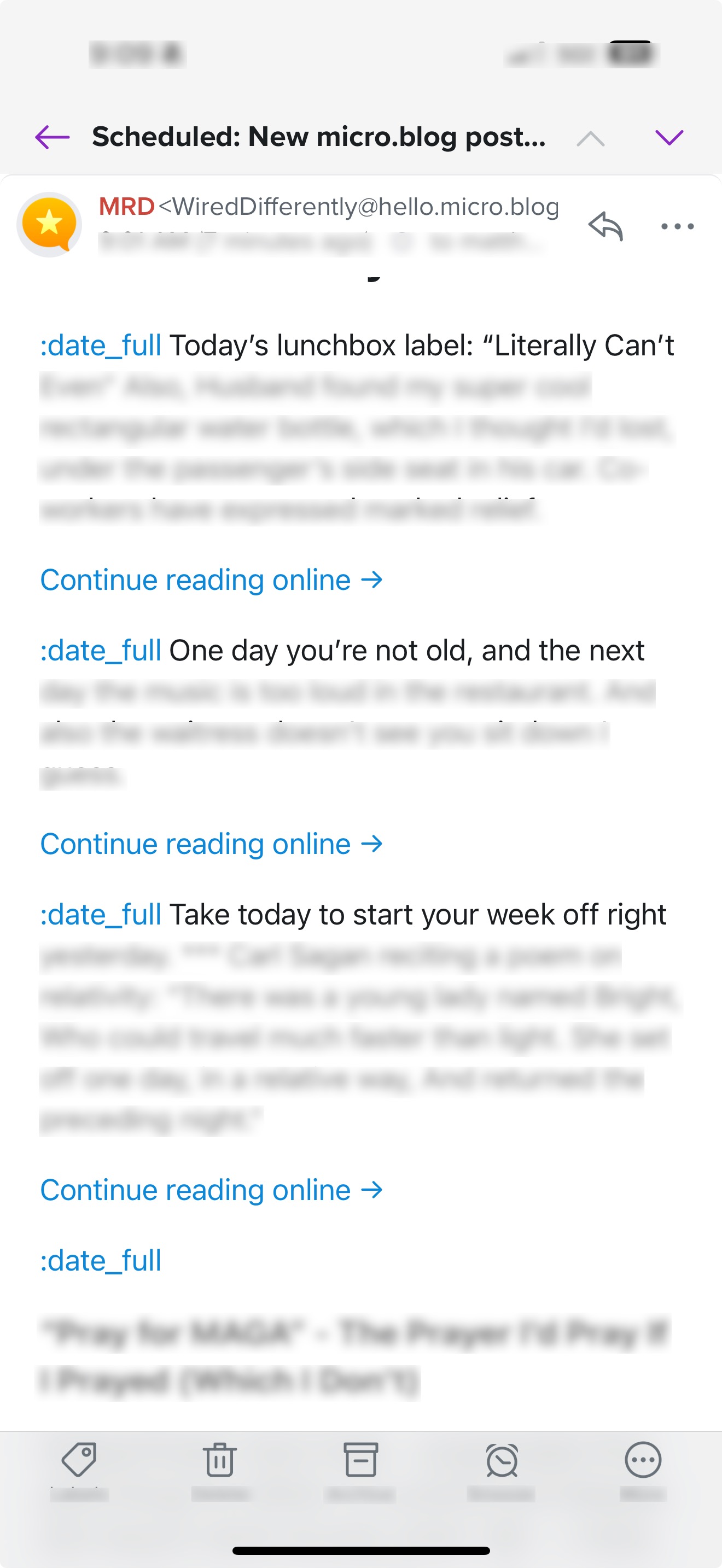
In my newsletter preview email notice, the post dates aren’t displaying as dates. Instead they show :date_full
Any advice?
Apologies if this is incorrectly categorized.
Hoping someone can point me in the right direction. 
Is this just in the preview, or does it show up in the actual newsletter when it’s sent?
Hi! I’m not sure how to tell without texting a friend who I know subscribes. Which is like one of three subscribers so I don’t know why I’m even bothered in the first place lol
I’ll ask and report back.
It is like that in the actual newsletter that gets sent, according to my friend.
Okay, I see the theme you’re using, mnml, is using a custom template for the newsletter. It would be interesting to know if this issue affects just you or all users of the mnml theme.
@jimmitchell1, do you recognize the date formatting problem mentioned in this thread?
@UndamnedOne I’ve fixed the date issue and pushed an update out.
- Once you update the theme (v2.5.9), you’ll need to navigate to “Newsletter” in Micro.blog.
- Next, click the “Settings” button.
- From there, delete the html in the “Edit the HTML template for your newsletter:” field and click “Update Settings”.
This will copy the updated HTML from the template into the newsletter template and you should be good to go again. Let me know questions from here. cc @sod
1 Like
Thanks so much! I’ve updated the theme and deleted the HTML as you’ve instructed. I appreciate you taking the time to look at this and help, Jim! 