Is there a way to export a list of all the paths from a blog? IE, I imported one of my blogs from WordPress, and all the paths on here are different than they were in WordPress. I’d like to build a redirect table to import into WordPress (do 301 redirects), but when I look at the table under “Manage Paths” they are truncated.
Is there a way to export the full, non-truncated list?
Maybe the sitemap could work? I’m not sure which site you mean, but the sitemap is usually available at /sitemap.xml. For example: https://unattributed.cc/sitemap.xml.
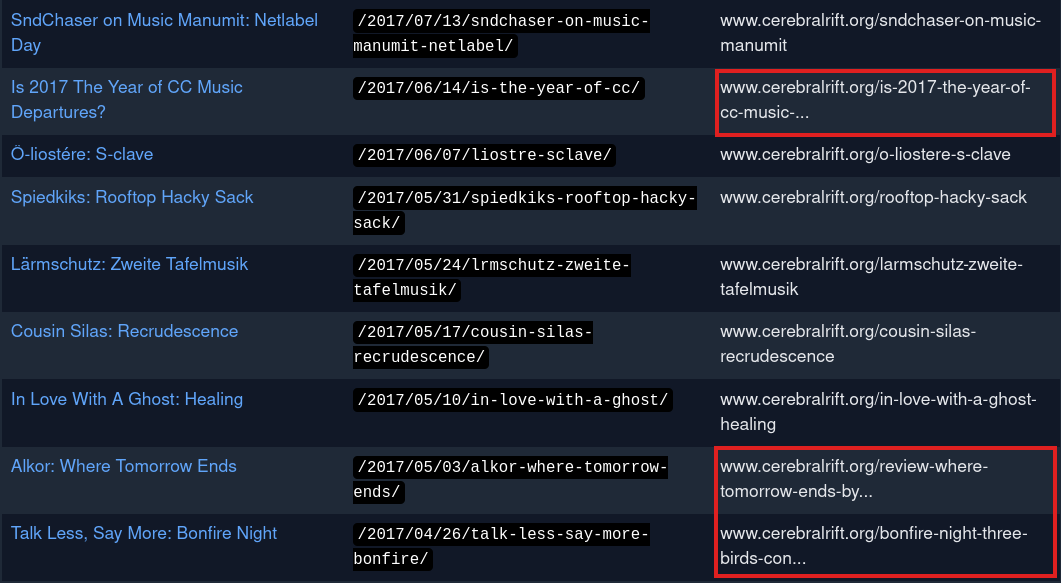
Nope that doesn’t do the job. I’m trying to map from my old website (a .org) to my new (.cc) domain. When I imported the posts from WordPress to micro.blog the slugs were mangled, so it’s not simple to map them. And in the “Manage paths” display the Migration URLs column gets truncated.
I’ll add an image to this post so you can see what I am talking about. I’ve marked a few entries in red. Also, compare the slugs between the columns, in some cases the slugs are mangled / changed from the original.
not sure how - but i THINK I saw a post from @manton saying that there is some kind of global replace - I need to do the same - just haven’t done it yet.
This isn’t a replace situation for me. I need to make list of redirects that live on my .org domain (ie, in WordPress) that point to my .cc domain (on micro.blog). Hence why I need to export the list.
I would just do this manually if it weren’t ~430 URLs that I need to do this for…
This is live now! On the Manage Paths page, there’s now an export link. CSV columns include Micro.blog’s internal post ID, the title or first part of the blog post, the URL path, and the old migration URL if imported from another platform.
Quick follow up… I was able to do a quick edit on the exported CSV for the migration paths, import it into my old site, and now have redirects for 400+ pages working.