I have uploaded some mp3s to Micro.blog that I now want to download. I can’t find a way to do that. It’s probably staring me in the face. If someone could help me out here I’d be really grateful.
Thanks,
John
I have uploaded some mp3s to Micro.blog that I now want to download. I can’t find a way to do that. It’s probably staring me in the face. If someone could help me out here I’d be really grateful.
Thanks,
John
Hi John,
You should be able to find your uploads on the uploads page.
Hi sod 
Thank you as always for your response. I can find the uploads I’m looking for … I just can’t download them. There’s no mechanism.
When you export a copy of your site by going to posts and clicking on the three dots there are a bunch of formats. The one that’s Markdown + files for Hugo will probably have the easiest to understand format for your static files in Uploads.
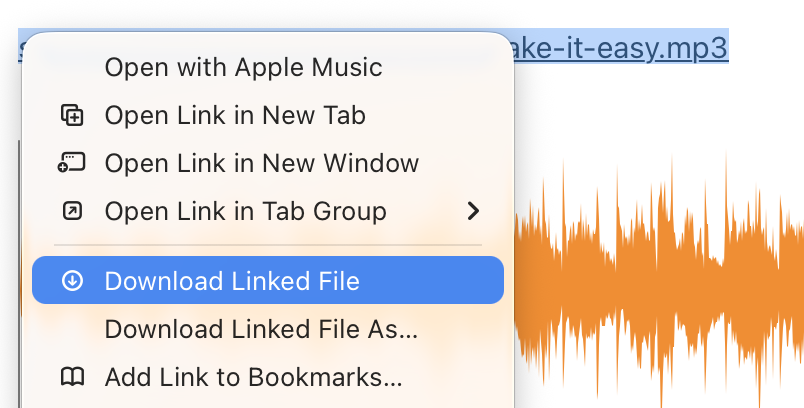
It may vary depending on your device and web browser, but here’s how to do it in Safari on macOS:
Hi Jason. Apologies for my slow reply. I’m just trying this now - the applicable export option seemed to be ‘Export HTML and uploads (.zip) — your blog as static files’. Looks promising. Waiting for micro.blog to say it’s ready.
Thank, as always, for your help.
Cheers,
John
Hello again, Sod, and apologies for my late reply.
Your method doesn’t work in Firefox. It kind-of works in Safari - the browser doesn’t show the wave form at all.just the linked file name, and the play button below a blank space. When I right-click on the filename, it does pop up the menu shown in your screenshot, including the option to ‘Download Linked File’.
So, Safari works to download specific uploads (thank you  ), but it doesn’t play the audio or show the wave form.
Firefox displays the wave form and plays the audio, but provides no option to download the audio 
As I mentioned in my last post, the exact procedure can vary, but most browsers let you download files. I just tried it in Firefox, and it worked as expected. In the right-click menu, the option is labeled Save Link As…
Hello, Sod. And of course, you’re right. The answer was staring me in the face all along. I’d love to offer a valid excuse for not having seen it, but … I don’t have one.
I’m always grateful for your assistance (and patience), and this occasion is no exception.
Many thanks again,
John