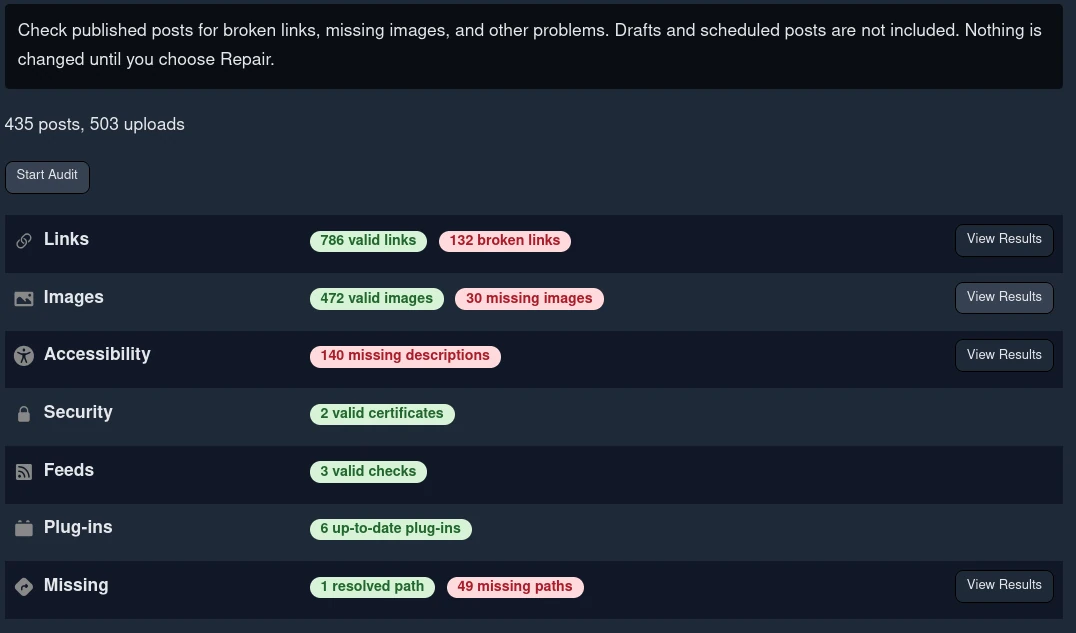
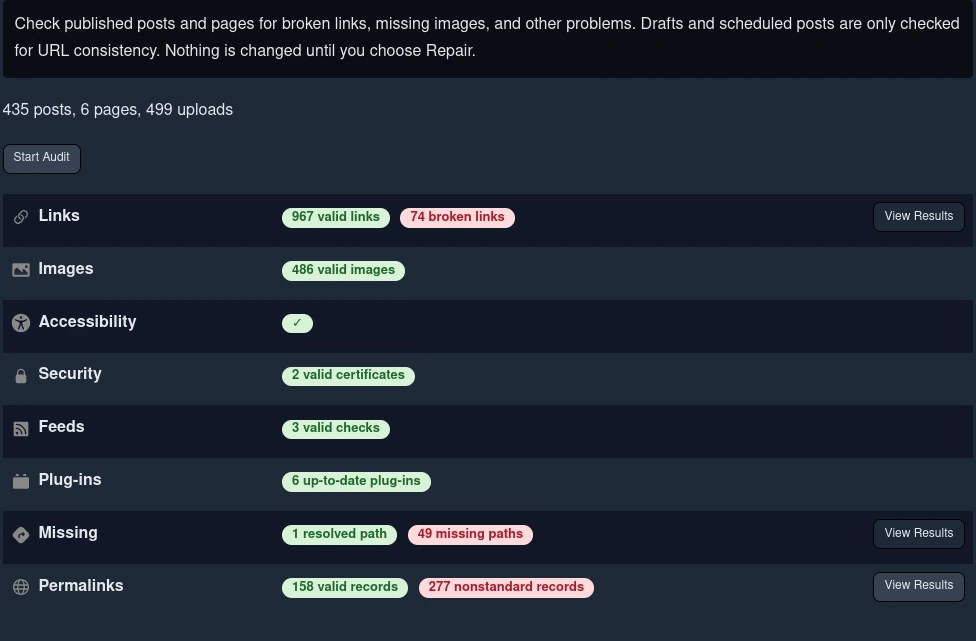
Thought I would try out the new Blog Audit tool against my largest site – basically give the tool a bit of a stress test. Here’s a snapshot of the results:
This is very much what I expected for this site. (This is the blog I am actively working on fixing the issues with after migrating from WordPress.)
A few comments on the results:
Missing images is an import issue. I’ve noticed several posts that didn’t get updated when the images were pulled down from my old site. The images are there, with a random name, just the references weren’t updated in the post.
Missing paths: I think this is an issue that needs to be looked at on your side @manton. This happened because I changed the title of the post when I was editing it, which generated a new slug. Generating a new slug broke the path.
Broken links: I’m working on those.
A few questions about this tool: is it rendering the pages and checking the results? Or is it scanning the markdown version of each post?
Does the tool test pages? It doesn’t indicate that it does.
What about checking custom headers / footers on the site? Might be useful to know if anything is missing / broken there.
Overall kudos on this tool. I have another thought: maybe this could be something that could be automated? IE, each user could enable it to run monthly or quarterly and send an email with the results? (Or store the report on the server and the user a link to the report.)
It converts Markdown to HTML and examines the result. It doesn’t currently actually render the HTML like a web browser would, but that’s something we could add later for accessibility / color testing.
It doesn’t test standalone pages. Most people only have a few of those. No reason we couldn’t add that.
By the way, you’ll notice that the missing paths is often capped at 50. We currently show the most common 50 failed requests for simplicity. This could be expanded in the future.
Also, since shipping the first version of this feature, I’ve improved the image checking so that there’s no an option to download and copy the missing image to your blog storage, if it can be found on the Wayback Machine. I think we could do more like that in the future to automatically consolidate missing pieces.
That’s pretty much what I expected: render the markdown to HTML as a standalone page, no theming, CSS, etc. (Basically the preview feature that’s available for draft / scheduled posts.)
The reason I asked about pages is I will likely be using more of them in the future, but I think testing them could be difficult. The big thing is that these pages will be large, and contain a lot of links. But I have plans to manage that from this side. (The idea is to build a set of indexes with articles grouped / sorted by specific attributes… But I’m pretty far off from working on it. Guessing it will be next year.)
IMO — I’m sure the image fix feature will work for most users. Personally, I’m in a different situation where I’ve been converting all my images to webp format, and in some cases down-scaling them so they load faster (I can’t see a reason to have 4000x4000 pixel images, when in most cases they’ll never be displayed over 1000x1000 pixels.)
But, I really appreciate the tool as it stands. It definitely does a lot of the heavy lifting for maintaining a site, especially sites with lots of posts.
Any thoughts on making something that could be scheduled and generate an emailed report?
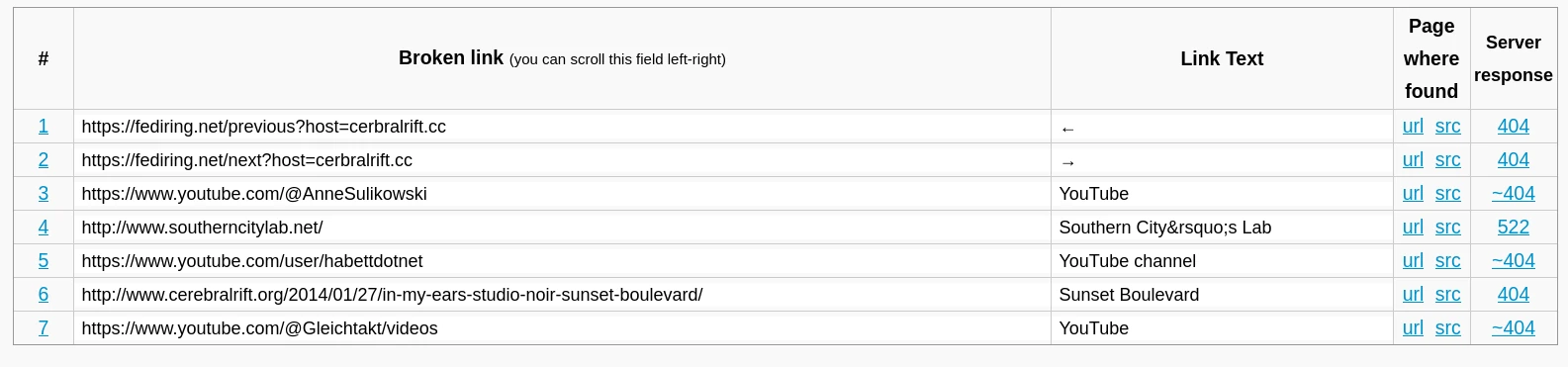
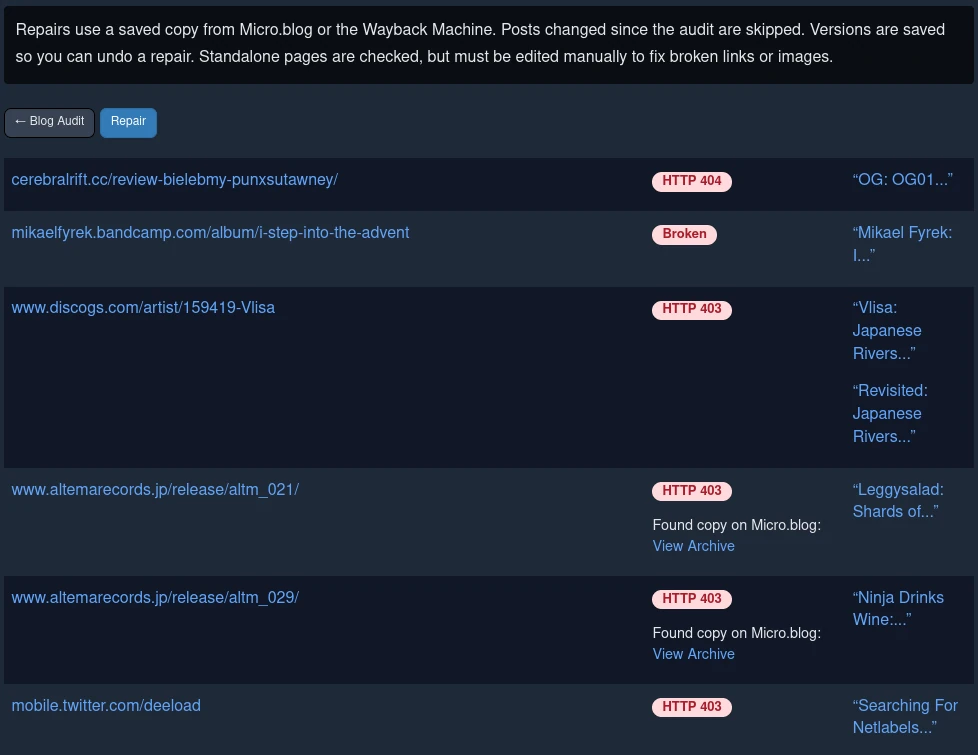
@manton Now that I have “finished” going through my site, I re-ran the report and have uncovered some issues. First, here’s a screenshot of the report summary:
That’s just a handful. But it is a very high percentage: 11 out of the first 16 in the report are false positives.
This URL: https://vk.com/badbrowser.php, I think is actually pointing to a likely cause for the majority of the false-positives. Basically the tool you are using is being seen as either a bot or an out of date browser. Some of these sites (like discogs) are definitely using Cloud Flare to block bots.
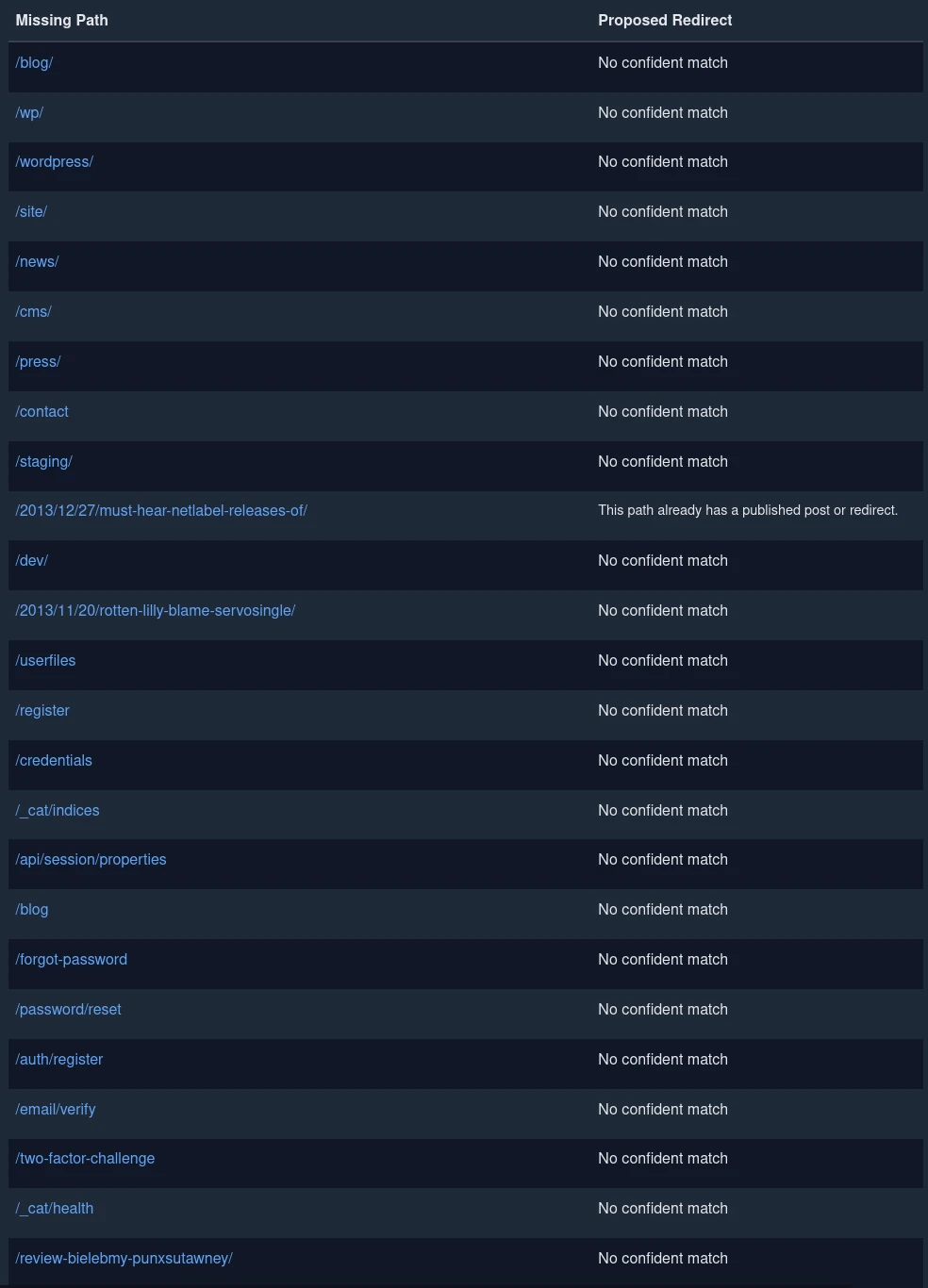
This is probably the most fun report, IMO. Why is it fun? Because it’s your chance to work on some security issues. The vast majority of these are attempted security breaches. You should be auditing your server logs for these, and comparing IP’s to known bot / hacker lists. Especially things like:
/dev/
/wp/
/wordpress/
/cms/
/staging/
/forgot-password
/password/reset
/auth/register
/two-factor-challenge
That last one is certainly the most serious of the hacking attempts. It appears someone is trying either some kind of injection attack, or they think they have credentials for the site.
Obviously none of these attacks are likely to be successful. But still, I think you’d want to do something about them. If for no other reason to reduce traffic that’s using your bandwidth.
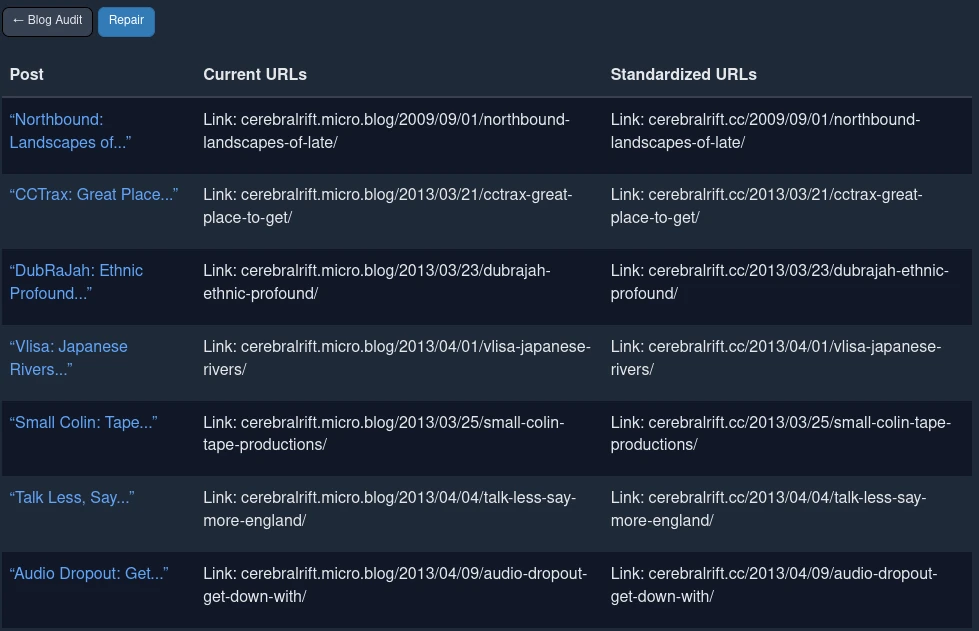
This actually shows an issue you may need to address. These happened because my WordPress export was imported before I’d set up my domain. I’d think that this wouldn’t be an uncommon case for users migrating from other sites to micro.blog.
There was something about this I couldn’t figure out: occasionally as I was working posts the permalink would change from cerebralrift.micro.blog to cerebrarlrift.cc seemingly randomly. In a few cases I know it changed because the slug for the post changed, but in the many cases the slug didn’t change. (I think the slug changed in maybe 5–10 posts, but not in the others.)
I’m going to do the repair for this, and re-run the blog audit to see if anything else breaks (and start fixing the things that I know I can fix).
I love this idea, but I’m not entirely sure what to do with the results, especially the “paths” results. Is that just a list of all the posts I’ve ever posted?
The “missing” paths are just things that people or bots have tried to access on your site that do not exist. In some cases they are bots / hackers trying to gain access to our sites (like the attempts to access /wp/ and /credentials). Some are missing because of differences in the site structure between WordPress and micro.blog (I didn’t show them in my image, but there were a bunch of /tag/xyz type entries which are WordPress category pages).
What can you do with them? Set up redirects under the pages menu. The /tags/xyz entries I could redirect to /categories/xyz, while the bots / hackers I could direct to a custom 404 page if I wanted…
This is all really good feedback. I’ve been digging into the broken links report. In one case above that I checked, Micro.blog was getting “403 forbidden” but it worked fine from my own computer, so something might’ve been blocking our servers specifically. Also we use HEAD requests for some checks, and some servers might not like that.
I’ll roll out some improvements to this today. If you see any other issues, let me know!
Many of these sites fail with the embedded browser in Obsidian (and typically with a 403 error). Yet, when I try a “normal” browser they work fine. What I’ve noticed is most of those sites have a proof of work challenge on them.
If you are using cURL or an embedded browser, that’s likely the culprit. They don’t know how to handle the proof-of-work.
But, there are a lot of them that don’t fit into this category (like BandCamp and X).
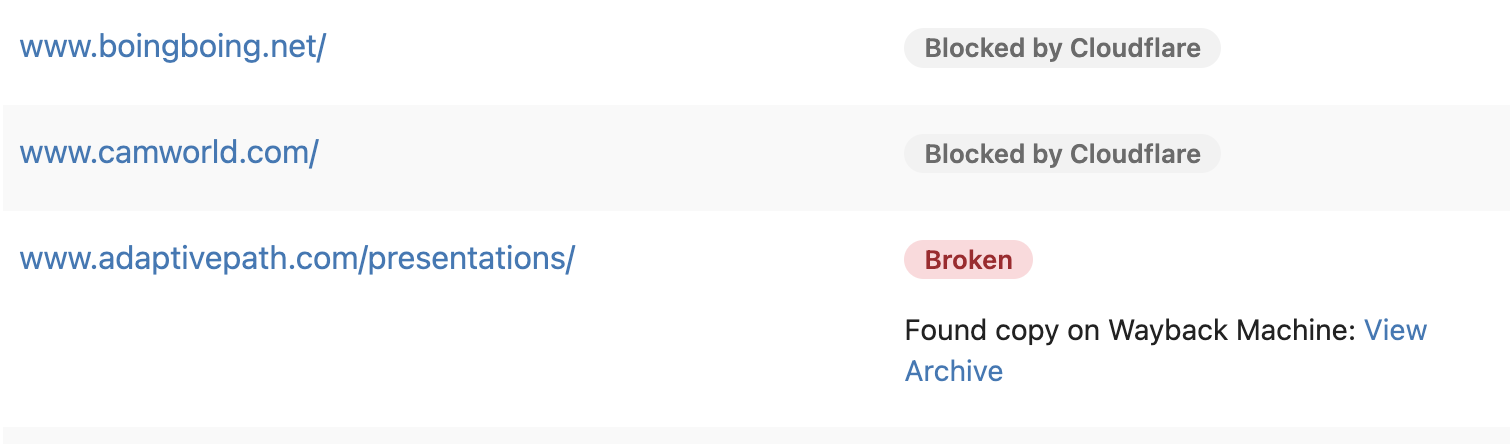
Yep, I’ve confirmed that some of them are getting a challenge from Cloudflare. For today’s update, I’m changing how those are handled in the Blog Audit so that it notes the challenge, but doesn’t count them as actual broken links.
For Bandcamp, they don’t like our user-agent string. I’m changing it to look more like a normal web browser. I don’t love doing that, but we’re just checking links, nothing nefarious.
I get that you don’t want to spoof a typical browser, which could make things seem like micro.blog is trying to hack sites. But, yeah, if you are just making HEAD requests I doubt it will be an issue.
Besides, it’s not all that uncommon to change the user agent to test site rendering. There are tons of tools that do that.
Okay, additional improvements are now live. I’m running it on my own blog and this is how it looks, where “Blocked by Cloudflare” is shown but does not count as an actual broken link.
Also, for the missing paths feature, let me explain a little more about how it works. There are hundreds of paths that we automatically block from bots trying to exploit our servers. Those will never show up here. When something does gets through, it might initially bubble up in the missing section, but as soon as we notice it, it will be excluded from the list. That does require some manual, human intervention, but over time I expect those missing requests to disappear from Blog Audit.
Missing paths also tries to match permalinks from other systems to Micro.blog-style paths. If it can do that, it will offer the option to repair the link, which creates a redirect for you. If you’re seeing lots of paths that you think Micro.blog should be able to repair automatically, let us know and I’ll add some logic for it.
 The vast majority of these are attempted security breaches. You should be auditing your server logs for these, and comparing IP’s to known bot / hacker lists. Especially things like: